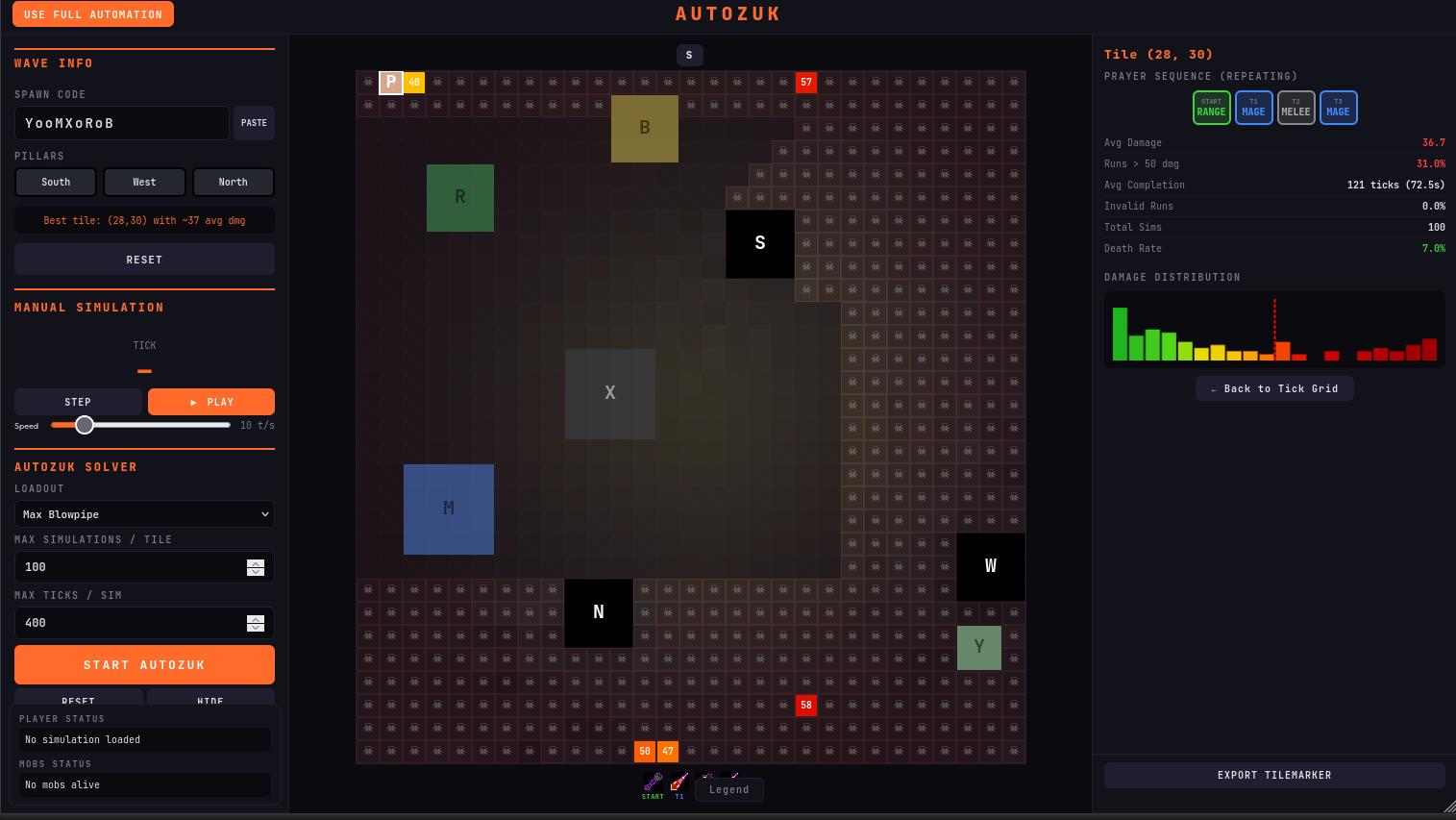
Autozuk — Computer-Solved Inferno Wave Solver
A browser tool that pre-computes the optimal starting tile and prayer-flick sequence for any scouted Inferno wave. Hold auto-retaliate, run the pattern.

AutoZuk is a browser tool that computes an optimal starting tile and a 4-tick prayer sequence for any Inferno wave, so the player can clear it with auto-retaliate plus a fixed prayer pattern. It is built on the Inferno Analysis Tool, a fork of the open-source Inferno Line of Sight tool extended with full monster movement, projectile and auto-retaliate simulation. Wave input comes from the Inferno Scouter RuneLite plugin, which records spawn positions and monster index numbers on the first tick of a wave.
How it works
Monsters spawn on tick 15 of every wave. Spawn tiles and the per-tick monster index (which determines action processing order when two mobs would act on the same tick) are deterministic once scouted. With those inputs known, the rest of the wave is simulable.
- Player and mob movement, attacks, projectile travel and line-of-sight are simulated each tick.
- Auto-retaliate targeting follows the in-game rule: when a projectile hits, the player targets the last monster to initiate an attack against them, not necessarily the projectile's source.
- Damage and accuracy use a configurable loadout (gear, prayers, magic level).
- For each candidate starting tile, the solver brute-forces all 256 possible 4-tick prayer sequences, runs many simulations and scores by average damage taken (or, in Blood Barrage mode, by peak HP missing).
- Every tile is scored; the lowest-damage tile + sequence is returned.
Features
- Browser-based, no install, free.
- Inferno Scouter RuneLite plugin (Plugin Hub) reads first-tick spawns and copies them as a wave code.
- Full simulation of all JalTok mob types under auto-retaliate, including subtick processing edge cases.
- Optimal starting tile + 4-tick prayer sequence per wave.
- Per-tile damage distribution, average damage, death chance.
- Tile-marker export for in-game visualisation.
- Mage tank loadout: hybrid armour with confliction gauntlets, ring of suffering, echo boots.
- Blood barrage loadout: scores on max HP missing rather than total damage; accounts for the AoE southwest-tile targeting rule and recoil-kill math against nibblers.
- Optional $2 iOS / Android companion app.
How to use it
- Install the Inferno Scouter plugin from the RuneLite Plugin Hub.
- Open the Autozuk web app in a browser.
- Log into the wave, stand in a corner, log out the moment monsters spawn (tick 15). The Scouter plugin records spawn positions and monster index numbers.
- Click Copy Code in the Scouter panel, paste it into Autozuk.
- Pick a loadout. Mage Tank + Blood Barrage is the recommended combination for waves 50+.
- Click Start Autozuk. It runs initial exclusions, then per-tile simulations. Larger waves take longer.
- Click Export Tile Marker and paste into RuneLite to see the recommended start tile and prayer sequence in-game.
- Log back into the wave and walk to the start tile. The tick timer resets on log-in, so if you can't reach the tile before tick 15, log out and back in.
- On tick 15, follow the prayer sequence shown in the Autozuk panel. Keep auto-retaliate on. Do not click any monster.
After the first one or two kills, the wave is usually trivial to finish manually, which also lets you clear the nibblers and save the pillar.
Limits
The video author (whose run is embedded above) clears every wave 1–66 with auto-retaliate only, but flags several caveats that apply equally to anyone using it:
- Nibblers cannot be targeted. Auto-retaliate ignores them. They eat your pillars — roughly one pillar per Autozuk'd wave. Pillarless runs require Blood Barrage plus ring of suffering and echo boots to recoil-kill them, which costs significant supplies.
- Waves 67–69 are out of scope. Jad, triple Jads and Zuk himself still have to be done manually. (Practice them on the Inferno Simulator.)
- It needs the right account. Mage tank gear (confliction gauntlets, ring of suffering, echo boots, hybrid armour pieces) and 94 magic for Blood Barrage are effectively required for the harder waves. Lower-tier accounts will not reproduce the demonstrated results.
- It is not automation. Every wave needs: scout, log out, paste wave code, run solver, copy tile marker, walk to tile, then prayer-flick the sequence by hand. The cognitive load is low but the per-wave input is not zero.
If you want the cape without per-wave input, the Detuks Inferno Plugin clears the Inferno end-to-end, or assists in semi-auto. Pick whichever matches the time you want to spend.
